Color, scripts, and color-font formats

FontLab 8 supports every current color OpenType format and ships with Python 3.11 scripting and the TypeRig library. This post covers the color workflow and scripting capabilities from the “Color” and “Scripts & extensions” chapters of the What’s New documentation.
Color in FontLab 8
Color work starts with the redesigned Colors panel.
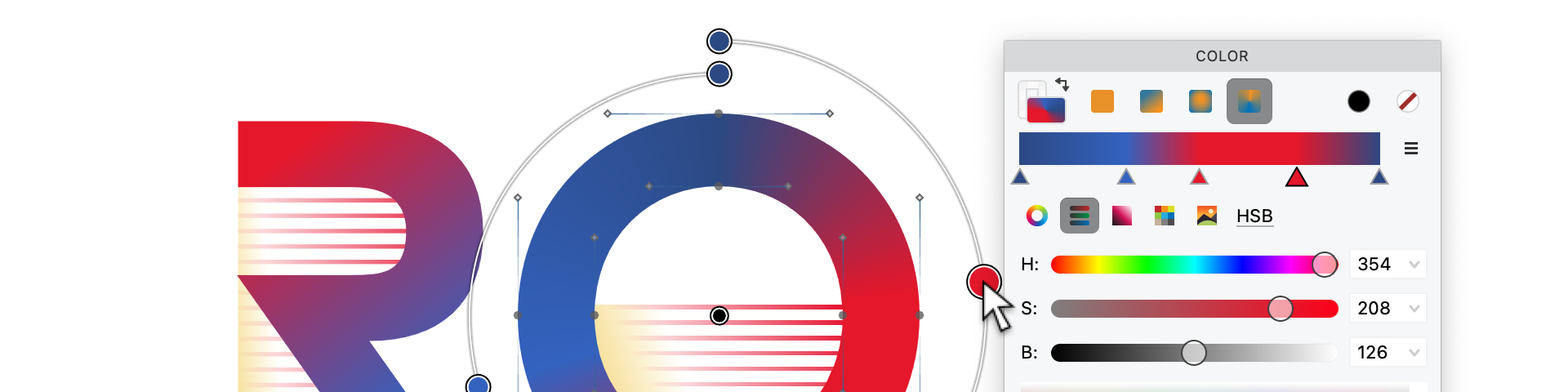
The panel has three sections: a color type selector at the top (stroke or fill; solid, linear gradient, radial gradient, or conical gradient); a color and gradient bar showing the current value; and gradient point controls for adding, removing, and repositioning stops when a gradient is active.
For gradients, the visual gradient editor opens in the Glyph window. You see the direction and stops overlaid on the actual glyph and edit them by dragging directly on the canvas — considerably faster than editing coordinates numerically.
Colors in FontLab are per-element. Different colors in different parts of a glyph require separate elements, one per color region. This maps directly to how OpenType color formats work internally.
The four color formats
FontLab 8 exports all four current OpenType color formats:
OpenType+COLR v0 — Vector layers with flat colors. Widely supported, compact, works in browsers and most desktop applications. Good for layered designs with solid fills.
OpenType+COLR v1 — Adds gradients, compositing operations, and variable color (gradient stops can vary along a variation axis). Supported in Chrome, Firefox, and recent design tools. The format for ambitious color designs.
OpenType+SVG — Full SVG graphics per glyph, supporting anything SVG supports. Supported in Firefox and some Adobe CC apps. Larger file sizes.
OpenType+sbix / CBDT — PNG bitmap images per glyph. Apple and Google’s original emoji formats. Supported everywhere emoji work. Multiple bitmap sizes are embedded at different resolutions rather than scaling from a single source.
A single color font project can export all four simultaneously. Users and distributors pick the format their environment supports.
Dark-mode palette
FontLab 8 can automatically generate a dark-mode palette companion for a COLR v1 font. The palette remaps light-background colors to dark-background equivalents — the mechanism that lets emoji and color fonts adapt to system light/dark mode without a separate font file.
Scripting with Python 3.11
FontLab 8 bundles Python 3.11 as a self-contained package — no system Python installation needed. On macOS and Windows, place FontLab-specific packages in the python/3.11/site-packages folder inside the FontLab user data directory.
Python 3.11 is 10–60% faster than the 3.10 in FontLab 8.0, and dramatically faster than the Python 2.7 in FontLab VI. The scripting panel provides an interactive console and a script editor.
TypeRig
TypeRig — developed by Vassil Kateliev of Karandash type foundry — is a comprehensive Python library for type design operations, shipped with FontLab 8. It exposes glyph-level operations, metric manipulation, contour transformations, and batch processing in a clean Python API.
For designers processing large glyph sets — adjusting stem weights across a master, applying systematic metric changes, building custom audit scripts — TypeRig turns hours of manual work into a few lines of code.
From FontLab 8.3, a post-export script can run automatically after every export. Point it at a TypeRig-based script that renames files, copies them to a distribution folder, or runs additional processing, and every export triggers it.
FontLab 8 imports and exports cleanly to and from RoboFont (UFO), Glyphs (.glyphs), FontForge (SFD), and other common formats. Cross-tool collaboration is practical.
Full documentation is in the FontLab 8 What’s New chapters on Color and Scripts & extensions.