Color fonts in 2026: COLR v1, SVG, sbix, and bitmap strikes

In 2013, color OpenType looked like a standards argument with four exits. Apple had sbix. Google had CBDT/CBLC. Microsoft had COLR/CPAL. Adobe and Mozilla had SVG-in-OpenType. The question then was which proposal would win. In 2026, the answer is less tidy and more useful: they all became real OpenType color font formats, but they did not become equally useful everywhere.
For scalable color display type on the web, COLR v1 is now the format to understand first. For Apple and many design-app workflows, SVG and bitmap flavors still matter. For emoji and legacy platform compatibility, sbix and CBDT/CBLC are still in the room, looking faintly pleased with themselves.
What actually shipped
The four 2013 proposals are no longer merely proposals. They are OpenType color glyph mechanisms with different strengths.
COLR/CPAL is the compact vector format. COLR version 0 stacks outline glyphs as layers, each filled with a solid color from CPAL. COLR version 1 keeps the outline-and-palette architecture but adds a paint graph: linear, radial and sweep gradients, transforms, compositing, blending, reuse of paint subgraphs, and variation data for the color construction itself. The OpenType specification is explicit: COLR needs CPAL; without a CPAL table, the COLR table is ignored. See the OpenType COLR and CPAL specs, the Chrome COLRv1 implementation notes, and the current Can I Use support data for the same shape of the story.
SVG is the rich vector-and-bitmap format. An OpenType SVG table stores SVG 1.1 documents for glyphs. Those documents can use gradients and can combine vector and raster artwork, but the OpenType subset deliberately forbids or discourages several web-SVG freedoms: scripts, links, foreignObject, many CSS mechanisms, interactivity, and other features that do not belong in a text renderer. SVG-in-OpenType can optionally use CPAL, but it does not get the same integration with OpenType Font Variations that COLR v1 gets.
sbix is Apple’s bitmap graphics table. It stores standard bitmap graphics such as PNG, JPEG or TIFF in size-specific strikes. It can provide beautiful emoji-style glyphs when the target size is known, and it can also store different artwork for different pixel densities. It is not the format you choose for infinitely scalable display type.
CBDT/CBLC is Google’s color bitmap pair. CBDT stores color bitmap glyph data; CBLC stores the locations and strike metadata. The pair extends the older embedded bitmap tables used for monochrome and grayscale bitmaps. It can store BGRA bitmap data or PNG images. It remains important because Android and older emoji workflows used it heavily, but like sbix, it is a bitmap strategy, not a scalable vector strategy.
The important change: COLR v1
The old Microsoft COLR idea was clean and limited: stack outline layers, fill each layer with one solid palette color, and rely on normal font rasterizers. That limitation was also the problem. Real display type wants gradients, shadows, highlights, depth, transparent overlays and reusable parts.
COLR v1 is the practical compromise. It keeps glyph outlines as the geometry, so the font remains compact and scalable. It uses CPAL palettes, so colors are data rather than hard-coded pixels. It adds the paint operations that designers actually need. It also participates in variable fonts: in a COLR v1 variable font, not only the glyph outlines but also alpha values, gradient stop positions, gradient placement and transform arguments can vary. By contrast, COLR v0 can vary the underlying outlines but not the color composition.
That last sentence is one of the big 2026 facts. Variable color fonts are no longer a contradiction. They are specifically designed into COLR v1. The OpenType spec describes the variation store in the COLR table, Google Fonts’ color-font guidance treats variable COLRv1 and SVG differently for exactly this reason, and FontLab 8 can export many variable COLRv1 fonts with gradients.
Palettes are now a web feature
CPAL stores one or more palettes, each made of sRGB color records. Palette 0 is the default. Version 1 of CPAL can label palettes and mark them as usable on light or dark backgrounds.
CSS caught up. The font-palette property lets a page choose a palette from a color font. The @font-palette-values rule lets a page override palette entries or define a new palette for a font family. This does not magically make every color font format work in every browser. It means palette selection has moved from wishful thinking into the CSS Fonts Level 4 model, and browser support for the CSS controls is now broad.
For production CSS, use feature queries and ordered fallbacks:
@font-face {
  font-family: "Example Color";
  src:
    url("/fonts/example-colrv1.woff2") format("woff2") tech(color-COLRv1),
    url("/fonts/example-svg.woff2") format("woff2") tech(color-SVG),
    url("/fonts/example-regular.woff2") format("woff2");
}

@supports font-tech(color-COLRv1) {
  .headline {
    font-family: "Example Color", sans-serif;
    font-palette: dark;
  }
}
The exact fallback stack depends on the fonts you can ship. The principle does not: declare the most capable source first, tag it with tech(), and include a normal monochrome font that still reads correctly.
Browser support as of 3 May 2026
The browser picture is better than it was, but it is still not one-format paradise.
| Environment | What to expect |
|---|---|
| Chrome and Chromium browsers | COLR v1 has been supported since Chrome 98. Edge follows the Chromium implementation line, and Can I Use lists Edge support from 98. |
| Firefox | COLR v1 is on by default from Firefox 107. Mozilla’s tracking bug and the Can I Use table agree on that point. |
| Safari and iOS Safari | COLR v1 is still not supported in Safari or iOS Safari in current Can I Use data. WebKit’s standards-position discussion remains the public place to watch. |
| CSS palette controls | font-palette and @font-palette-values have broad support: Chrome, Edge, Firefox, Safari and iOS Safari all support the CSS palette controls in current MDN and Can I Use data. |
This creates one mildly annoying rule: Safari can support palette CSS while still not supporting COLR v1 glyph rendering. Those are different layers of the stack. Test the actual font technology, not only the CSS property.
App and platform support
Application support is messier than browser support because most apps sit on top of a text stack, an OS text API, a graphics engine, and their own export code. Support for “color fonts” is therefore not one checkbox.
On Windows, DirectWrite exposes multiple glyph image formats, including COLR, SVG, PNG, JPEG, TIFF and bitmap BGRA data. That does not mean every Windows app renders every color-font flavor equally. It means the platform API has a route for applications that use the relevant DirectWrite interfaces and Windows build.
In FreeType-based stacks, the split is also important. FreeType exposes COLR layer data and has convenience rendering for limited COLR v0 cases, but its own documentation says COLR v1 needs a dedicated graphics library such as Skia or Cairo to draw the paint tree. HarfBuzz now has paint APIs whose stated purpose is extracting and painting COLR v1 glyph layers. So a Linux or cross-platform app may be excellent, partial, or oblivious depending on which versions and renderers it bundles.
Adobe support is app-by-app. Photoshop’s official documentation describes OpenType-SVG support. InDesign’s documentation also describes OpenType-SVG color fonts and emoji fonts. Current Illustrator documentation lists both SVG fonts and COLR fonts, and describes COLR fonts as supporting gradient-filled text styles. That is useful, but it is not permission to skip app testing. The font format may render; editing, exporting, PDF output and variable-axis behavior can still differ between apps.
For Apple platform work, keep the distinction sharp. sbix exists because Apple shipped bitmap color emoji early. Safari still does not support COLR v1 as of this writing. If Safari or iOS is the target, a COLRv1-only font is not enough.
What FontLab 8 supports
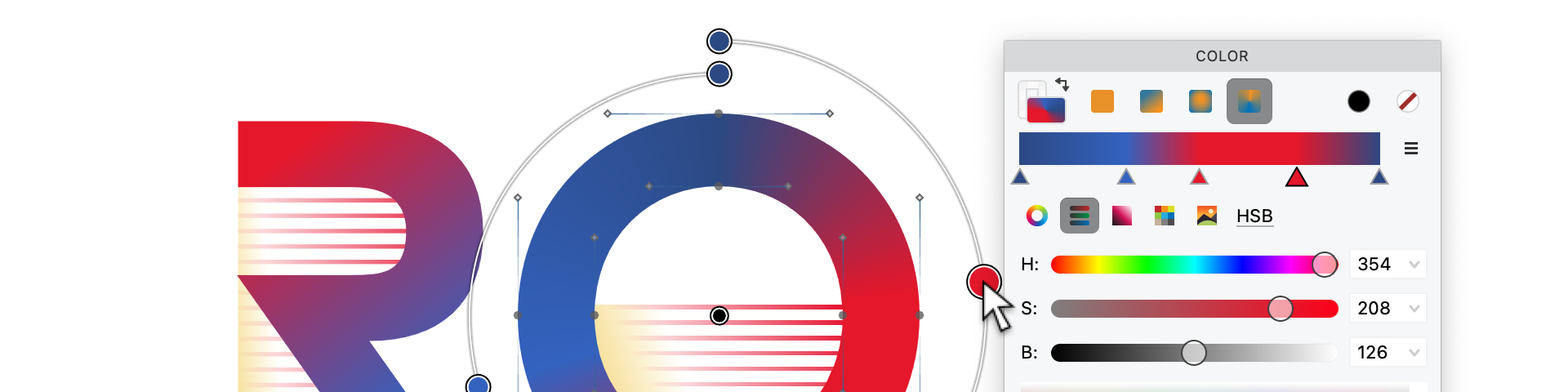
FontLab 8 is built for this mixed reality. You can paste, import and edit color vectors, gradients and images; assign solid colors and linear, radial or conical gradients to elements; edit gradients visually; and build layered chromatic fonts.
For export, FontLab 8 writes all relevant color OpenType flavors: OpenType+COLR, OpenType+SVG, OpenType+sbix and OpenType+CBDT. The current FontLab 8 documentation says FontLab 8.2 added OpenType COLRv1 support. The format notes are more specific: solid-color elements export as COLR v0, gradient elements export as COLR v1, the exported CPAL table can include an automatically generated dark palette, and many variable color fonts can be exported in the COLRv1 flavor. The FontLab product page also lists Color OpenType import/export for TTF+SVG, COLR v0/v1, CBDT and sbix.
In practice, that means you should design one source and export the flavors your target environment needs. For a web display family in 2026, start with WOFF2 COLRv1 plus a monochrome fallback. If Safari matters, add an SVG flavor or another fallback strategy. If emoji-style bitmap fidelity matters, consider sbix or CBDT/CBLC. If the font is variable and color, prefer COLRv1 for the color construction.
The 2013 lesson that still holds
The best color font format is not the most powerful one. It is the format whose limits match the job.
Use COLR v1 when you need compact, scalable, palette-aware, variable-capable color glyphs. Use SVG when your target app supports it and your artwork really needs SVG’s richer model. Use sbix or CBDT/CBLC when bitmap artwork is the point, especially for emoji-style glyphs or legacy environments. Always include a readable monochrome fallback unless you control every renderer.
The dream of one color-font flavor everywhere is still premature. The good news is that the source workflow no longer has to be premature. FontLab 8 lets the designer work once, then ship the color formats the world actually uses.
References
| Item | Sources |
|---|---|
COLR v0/v1, CPAL, gradients, paint graphs and COLRv1 variation |
OpenType COLR, OpenType CPAL, Chrome COLRv1 notes, FontLab 8 formats |
| SVG-in-OpenType capabilities and limits | OpenType SVG, OpenType CPAL relation to SVG, Adobe OpenType-SVG help |
sbix and CBDT/CBLC bitmap behavior |
OpenType sbix, OpenType CBDT, OpenType CBLC, Noto Color Emoji notes |
| Browser support for COLRv1 and palette CSS | Can I Use COLRv1, Chrome COLRv1 notes, Mozilla COLRv1 bug 1791558, WebKit COLRv1 standards position, Can I Use font-palette, MDN font-palette |
| App and renderer support | DirectWrite glyph image formats, FreeType color layer management, HarfBuzz paint API, Adobe Illustrator supported fonts, Photoshop SVG fonts, InDesign fonts |
| FontLab 8 support | FontLab 8 color features, FontLab 8 formats, FontLab 8 color tutorial, FontLab 8 product page |